ChatGPT sees a blank page: why AI doesn't read what you see on your website, and how to fix it
 By Petya K.5 min read
You ask ChatGPT about your industry in your city. It answers with three competitors. You are not there. You open your website and it looks perfect: clear headline, services, reviews, contact button.
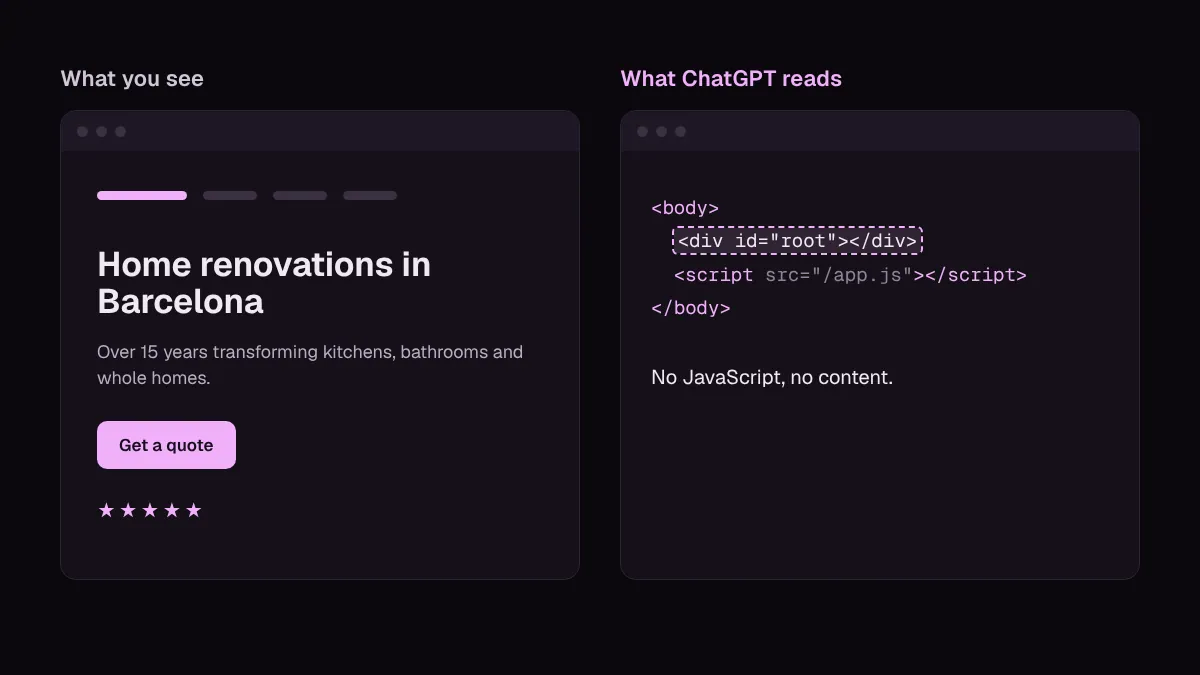
The problem is that ChatGPT does not see what you see. On many of the websites we audit, what AI actually reads is an almost blank page.
That is not a metaphor. It is literal, and you can check it in five minutes.
What you see is not what AI reads
When you open your website, your browser does two things: it downloads the HTML and then runs JavaScript, which on many sites is what draws the text, images and buttons.
AI crawlers usually only do the first. In December 2024, Vercel and MERJ analysed hundreds of millions of bot visits and concluded that none of the major AI crawlers run JavaScript: not OpenAI’s (GPTBot, OAI-SearchBot, ChatGPT-User) and not Anthropic’s (ClaudeBot). They download the JavaScript files, but they do not execute them (source).
Google is the exception: Googlebot does render JavaScript, and Gemini uses that same infrastructure. That is why a website can rank well on Google and be invisible in ChatGPT at the same time. Google understanding you no longer guarantees that AI does.
4 reasons ChatGPT sees a blank page
1. The content only exists with JavaScript
It is most common on websites built as apps (React, Vue or Angular without server-side rendering), but it also happens on ordinary sites: tabs, accordions, carousels, reviews or prices loaded by a widget after the page opens.
The HTML the bot receives looks something like this:
<body>
  <div id="root"></div>
  <script src="/app.js"></script>
</body>
To a person, there is a full website there. To ChatGPT, there is an empty container.
2. Your text is inside images
The homepage headline baked into a photo, the restaurant menu as a scanned PDF, the services in a banner. They look fine, but they are not text. And if the image has no alt text either, to AI (and to Google) there is nothing there.
3. The door is closed: robots.txt or your firewall
Sometimes the content is there, but the bot cannot get in. OpenAI uses three different agents (official documentation):
- GPTBot: crawls content that may be used to train its models.
- OAI-SearchBot: decides whether your site appears in ChatGPT’s search answers.
- ChatGPT-User: visits a page when a user asks ChatGPT to read it.
Plenty of websites blocked “AI” in their robots.txt a couple of years ago with training in mind and, without realising, also shut the door on ChatGPT Search. If OAI-SearchBot is blocked, you do not appear in its answers.
And there is one block you may not even have chosen: since July 2025, Cloudflare blocks AI crawlers by default on many new websites. If your site runs through Cloudflare, it is worth checking that setting.
4. A wall in front of the content
“Verify you are human” screens, anti-bot checks or cookie walls that cover the page until someone clicks. A person gets through in a second. A bot gets stuck on the waiting screen, and that is all it reads.
How to check in 5 minutes
You do not need to be technical. These five tests cover almost every case:
- View the source. Open your page, press
Ctrl+U(Cmd+Option+Uon Mac) and search for your main headline withCtrl+F. If it is not in the source, AI does not see it either. - Turn off JavaScript. In Chrome, open developer tools (
F12), pressCtrl+Shift+P, type “Disable JavaScript” and reload. What is left on screen is roughly what an AI bot reads. - Try to select your text. If you drag the mouse over the headline and it does not highlight, it is an image.
- Open your robots.txt. Go to
yourdomain.com/robots.txtand look forGPTBot,OAI-SearchBotor aDisallow: /underUser-agent: *. - Ask ChatGPT. Paste the URL of one of your pages and ask it to summarise what it says. If it replies that it cannot access it, or makes the content up, you have a problem.
How to fix it
It depends on which of the four causes it is, but the order of priorities is almost always the same:
- Make the HTML arrive with the content. If your site is a JavaScript app, the real fix is server-side rendering or static generation (Next.js, Nuxt or Astro all support it). In the meantime, prerendering works as a patch: the server hands bots a ready-built version of the page.
- Text as text. Headlines, services and prices in HTML, not inside images. And descriptive alt text on the images that do carry information.
- Open the door you want open. Decide separately: you can block GPTBot (training) and allow OAI-SearchBot (search). Also check the AI bot settings in Cloudflare or your firewall.
- No walls for legitimate bots. Anti-bot checks should not trigger for verified crawlers or cover the main content.
- Then organise it. Once the content is in the HTML, schema and an llms.txt file help AI understand what each thing is. Before that, they do not do much.
When we rebuilt our own website, we chose a static site for exactly this reason: every page leaves the server with all its content in the HTML. We tell the story in how we moved from WordPress to Astro without losing SEO.
Why it matters now
More and more people ask ChatGPT before they ask Google. And AI does not recommend what it cannot read: if your website is a blank page to it, it will recommend whoever does give it the information.
The good news is that it is usually a specific technical problem, not a content problem. Your website may have everything it needs to be the answer; you just need to make sure AI can read it. If you want to go further, in how to show up in AI answers I explain what else it takes into account, and the SEO audit checklist covers the rest of the technical checks.
Check it for free
Our free SEO audit reads your page the way an AI crawler does: without running JavaScript. We tell you whether the content shows up, which AI bots your robots.txt blocks and whether there is a wall keeping them out. You get it by email within one or two working days, in plain language.
Have you tried asking ChatGPT about your own website? Tell me what it said.